
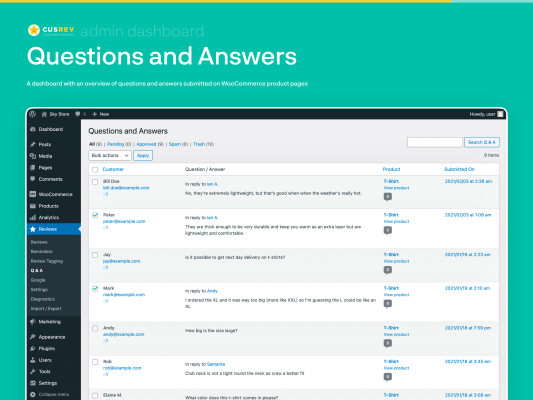
Customer Reviews for WooCommerce is a feature‑rich WordPress plugin that helps WooCommerce store owners collect, manage, and display product reviews, ratings, questions, and customer feedback in a professional and engaging way. It’s designed to go beyond the standard WooCommerce review system by adding automation, reminders, enhanced displays, and social proof features to help boost trust and conversions on your shop. WordPress.org Corsu
With over 80,000 active installations, this plugin has become one of the most popular free solutions for adding advanced review capabilities to WooCommerce stores.
What This Plugin Does
Review Request Emails & Reminders
Sends automatic or manual email reminders to customers after they complete a purchase, inviting them to leave a review.
Emails are customizable in text, timing, and appearance, and can be sent days or weeks after purchase to improve response rates. WordPress.org Corsu
Enhanced Review Submission
Customers can leave ratings, text reviews, images, and videos about products.
Reviews can include rich content that helps future buyers make smart decisions.
Review forms can be shown on product pages or via aggregated forms. WordPress.org Corsu
Boost Engagement & Trust
Includes features like customer Q&A, review filtering, voting (helpful/not helpful), and trust badges.
Encourages user engagement and builds social proof. WordPress.org Corsu
SEO & Visibility Enhancements
Adds structured data (schema markup) for reviews, helping Google recognize your product ratings in search results.
Reviews generate user‑generated content, which can improve SEO and increase organic shop visibility. WordPress.org Corsu
Flexible Display Options
Comes with built‑in shortcodes and blocks to display review grids, sliders, or rating summaries anywhere on your site — including product pages, landing pages, or dedicated testimonials pages. WordPress.org Corsu
Integration & Extras
Optionally integrates with the external CusRev service for verified and aggregated reviews, making it easier to collect and showcase authentic customer feedback.
Supports showing review counts, stars, images, videos, and even offering discounts as incentives for reviews. WordPress.org Corsu
Why It’s Useful for Your WooCommerce Store
Increase Engagement
Customers are more likely to leave a review if you ask them — and automated follow‑ups help you collect more reviews without manual work. WordPress.org Corsu
Build Trust & Credibility
Displaying reviews with rich content (stars, photos, videos) helps potential buyers trust your products and brand. WordPress.org Corsu
Boost Conversions
Stores with visible, high‑quality reviews typically see higher sales and conversion rates because new visitors rely on social proof. WordPress.org Corsu
Improved SEO
User‑generated review content often includes natural search keywords, and the plugin’s structured data can help your products show star ratings in search results. WordPress.org Corsu
Plugin Highlights & Features at a Glance
- Automated or manual review invitations
- Customer ratings, text reviews, images, and videos
- Review reminders via email (and optional WhatsApp links)
- Review Q&A section on product pages
- Shortcodes/blocks for customizable reviews display
- Structured data (schema) for SEO visibility
- Review filter, voting, and sorting options
- Trust badges to highlight verified feedback
- Import/export reviews tools
- Localization into multiple languages (30+) WordPress.org Corsu
Installation & Quick Setup Tips
Log in to your WordPress dashboard.
Go to Plugins → Add New.
Search for “Customer Reviews for WooCommerce”.
Click Install Now → Activate.
Go to the plugin settings to configure email reminders, display templates, review forms, and structured data options.
Once set up, the plugin will start sending review invitations automatically based on completed orders and will display reviews in a variety of engaging formats throughout your WooCommerce store