
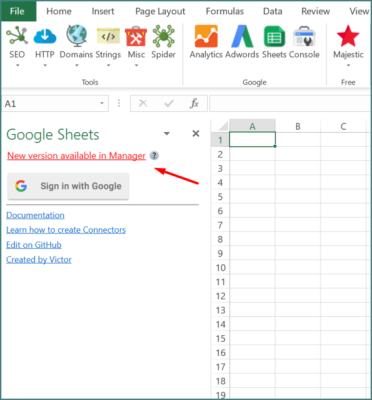
SEO Tools for Excel is a powerful downloadable Excel add-in that transforms Microsoft Excel into a full-featured SEO analysis platform. Designed for SEO professionals, digital marketers, and data analysts, this tool allows you to pull, analyze, and manipulate SEO data directly within spreadsheets—eliminating the need for multiple tools.
If you work heavily with data, reporting, or large keyword lists, SEO Tools for Excel is one of the most efficient ways to scale your SEO workflow.
🚀 What is SEO Tools for Excel?
SEO Tools for Excel is a plugin that adds hundreds of SEO-related functions and API integrations directly into Excel. Once installed, it creates a new toolbar where you can access tools for:
- On-page SEO analysis
- Backlink checking
- Keyword data extraction
- Web scraping
- API integrations
It essentially turns Excel into a data-driven SEO command center.
🔑 Key Features of SEO Tools for Excel
🔍 On-Page SEO Analysis
- Extract page titles, meta descriptions, H1 tags
- Analyze HTML structure directly from URLs
- Verify proper on-page SEO setup
🔗 Backlink & Off-Page SEO Tools
- Check backlink status and availability
- Analyze link profiles using integrations (Majestic, Moz, etc.)
- Monitor external SEO signals
📊 API Integrations with Top SEO Platforms
- Connect to tools like Google Analytics, Ahrefs, SEMrush, and more
- Pull large datasets directly into Excel
- Automate SEO reporting workflows
🧠 Advanced Data Functions & Automation
- Use custom formulas for SEO metrics
- Perform regex extraction, XPath scraping, and domain analysis
- Work with large datasets efficiently (thousands of URLs)
🕷️ Built-In Website Crawler (Spider)
- Crawl websites directly from Excel
- Analyze pages in bulk
- Identify technical SEO issues at scale
📈 Reporting & Data Visualization
- Build custom dashboards
- Combine SEO data with business metrics
- Automate recurring reports for clients or internal teams
📈 SEO Benefits of Using SEO Tools for Excel
Using SEO Tools for Excel can significantly improve your workflow and results:
- Analyze large datasets quickly
- Automate repetitive SEO tasks
- Improve technical and on-page SEO accuracy
- Build advanced SEO reports
- Scale keyword research and competitor analysis
Excel itself is already a powerful SEO tool for tracking rankings, backlinks, and performance—this add-in takes it to the next level.
💡 Why Use SEO Tools for Excel?
This add-in is especially valuable for data-driven SEO professionals who need flexibility and control.
Top advantages:
- Works directly inside Excel (no switching tools)
- Handles large-scale SEO data
- Highly customizable with formulas and APIs
- Ideal for agencies and advanced users
- Free version available with paid upgrades
⚠️ Limitations to Consider
- Windows + Excel desktop only (no Mac or Google Sheets support)
- Requires some Excel knowledge to fully utilize
- Some integrations require API keys or paid subscriptions
🎯 Who Should Use SEO Tools for Excel?
- SEO agencies managing large datasets
- Technical SEO specialists
- Data analysts and marketers
- Freelancers handling SEO reporting
- Anyone working heavily in Excel
🔽 Download SEO Tools for Excel
Get the official add-in here:
👉 https://seotoolsforexcel.com/
(Downloadable Excel add-in – Windows desktop required)
🏁 Final Thoughts
SEO Tools for Excel is one of the most powerful add-ins available for turning Excel into a full SEO analysis platform. With its ability to integrate APIs, automate workflows, and process massive datasets, it’s a must-have tool for serious SEO professionals.
If you want complete control over your SEO data and reporting, SEO Tools for Excel is one of the best downloadable add-ins you can use.